
What is an Inventory Management System?
UNDERSTANDING WHAT AN INVENTORY MANAGEMENT SYSTEM IS
An inventory management system is software that streamlines and automates all tasks related to inventory inflow and outflow, including sales, purchasing, and production.
Instead of recording inventory transactions manually using Excel or handwritten ledgers, which often leads to heavy workload, delays, and human errors, inventory management system automatically updates stock levels as soon as sales, purchase, or production entries are made. This removes the need for separate inventory slips and significantly reduces mistakes and omissions.
In addition, an inventory management system provides real-time visibility into stock balances and transaction history. This allows businesses to accurately track inventory movement, make informed decisions, and improve communication between departments through consistently updated information.

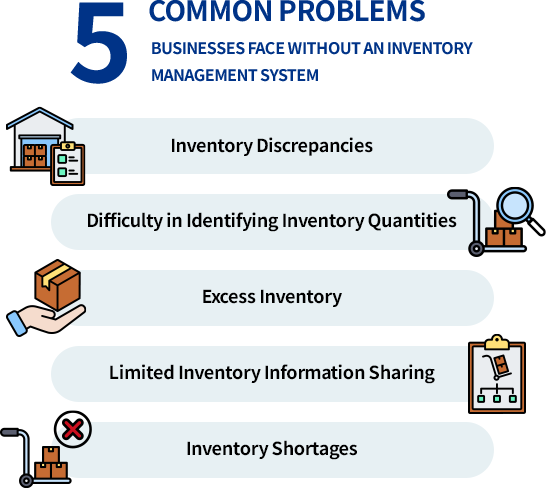
5 COMMON PROBLEMS BUSINESSES FACE WITHOUT AN INVENTORY MANAGEMENT SYSTEM
As a company grows, the variety and quantity of items handled gradually increase,
and the number of tasks to manage, such as inventory in/out operations, purchase planning, and inventory audits, also rises.
If a proper inventory management system is not in place, various issues may occur.
1) Inventory Discrepancies
If sales and purchase records are managed separately from inventory in/out records,
there is a high possibility of discrepancies due to incorrect entries or omissions.
By using an inventory management program, sales, purchases, and production records are automatically reflected in inventory,
preventing input errors and enabling more accurate inventory management.
2) Difficulty in Identifying Inventory Quantities
If the quantities received or shipped at warehouses, factories, or stores are not reflected in the inventory book in real time,
it becomes difficult to accurately determine the current location and quantity of inventory.
With an inventory management program, entries made by each person in charge are immediately reflected in the inventory book,
allowing you to check an accurate inventory book with the latest information.
3) Excess Inventory
Unplanned purchase orders without considering current inventory can lead to excess inventory.
Inventory is equivalent to cash. Excess inventory reduces inventory turnover, negatively impacting cash flow,
and unsold inventory may spoil or become outdated, resulting in a loss of product value and company losses.
By utilizing an inventory management program that easily calculates required purchase order quantities, excess inventory can be prevented in advance.
4) Limited Inventory Information Sharing
Inventory reports created on paper or Excel files are not easily accessible to employees other than those in charge.
Different versions of reports may exist, leading to discrepancies in inventory data.
An inventory management program is necessary to allow all responsible personnel to freely view and share inventory information.
5) Inventory Shortages
If appropriate inventory levels are not maintained due to missed purchase orders,
it may not be possible to fulfill sales orders on time or production schedules may be disrupted due to shortages of raw materials.
By utilizing an inventory management program, items with insufficient inventory can be easily identified and addressed promptly.
ECOUNT INVENTORY MANAGEMENT SYSTEM VS MANUAL TRACKING
The ECOUNT Inventory Management System makes managing stock much easier than using manual methods like Excel or handwritten records.
Manual tracking takes a lot of time and often leads to mistakes, missing entries, and outdated information.
With ECOUNT, inventory updates automatically whenever you record a sale, purchase, or production activity.
This means you always see accurate, real-time stock levels without extra work.
ECOUNT also helps different departments share the same information, preventing confusion and improving overall efficiency, something manual tracking cannot provide.
| Features | Manual Tracking | ECOUNT Inventory Management |
|---|---|---|
| Real-time updates | May cause outdated inventory. | Updates inventory instantly with each transaction. |
| Multi-Location Tracking | Manual multi-warehouse tracking is slow, confusing, and error-prone. | Syncs real-time stock across all locations. |
| Barcode Scanning | No barcode support means all data must be entered manually. | Enables fast, accurate barcode-based inventory. |
| Production Tracking | Manual tracking of materials and goods leads to frequent mistakes. | Updates inventory automatically from production and materials. |
| Cost Control | Makes cost calculations slow and unreliable with poor visibility. | Ensures accurate, automated cost control. |
BOOST YOUR OPERATIONS WITH THESE ECOUNT INVENTORY MANAGEMENT SYSTEM IMPROVEMENTS
1) Inventory is Automatically Updated When Sales, Purchases, or Production Slips are Entered
Sales, purchases, and production slips are immediately reflected in inventory, eliminating the need for separate inventory management.
2) Inventory Reports can be Checked in Real-Time
Various inventory reports, such as inventory balance by location, inventory book, and inventory change history, can be checked immediately as needed on PC or smartphone.
3) Inventory In/Out can be Managed Using Barcodes
Inventory transactions can be easily entered by scanning barcodes with a barcode scanner or smartphone, enabling efficient management even as the number of item types increases.
4) Inventory Shortages can be Prevented
By using the ECOUNT Inventory Management Program, you can receive notifications in case of inventory shortages, and the required purchase order quantity to maintain appropriate inventory levels is automatically calculated to prevent shortages.
5) Customers can Place Orders Directly Online
ECOUNT's Inventory Management Program provides an Online Ordering System that allows customers to place orders directly, reducing the risk of missed or incorrect orders.
