
What is an Inventory Management System?
Definition of Inventory Management System
An inventory management system is a digital software that helps businesses monitor, organize, and control inventory data in real time.
It provides a centralized platform to record stock quantities, item movement, and inventory status across warehouses, stores, or production facilities.
Rather than relying on manual management, an inventory management system automatically tracks inventory as it is received, stored, transferred, and issued.
This allows businesses to maintain accurate stock records, avoid data inconsistencies, and respond quickly to changes in demand.

Key Features of an Inventory Management System
To manage inventory efficiently, businesses need more than spreadsheets or manual tracking.
A modern inventory management system combines real-time data, automation, and centralized control to reduce errors and optimize stock levels.
The following key features show how an inventory management system helps businesses operate with greater accuracy and confidence.
1. Real-Time Inventory Tracking
Real-time inventory tracking is the foundation of an effective inventory management system.
It gives businesses instant visibility into current stock levels, movements, and availability without relying on manual counts or delayed updates.
As products are received, sold, transferred, or returned, inventory data updates automatically.
This allows business to know exactly what is in stock at any moment, across all channels and locations.
With accurate, real-time inventory data, businesses can confidently accept orders, prevent overselling, and avoid unexpected stock issues.
More importantly, real-time tracking supports faster decision-making. When inventory information is always current, businesses can respond quickly to changes in demand, optimize replenishment timing, and maintain consistent service levels for customers.
2. Detailed Reporting and Analytics
An inventory management system doesn't just collect data, it turns raw inventory data into clear and actionable insights.
With these insights, businesses can analyze stock levels, sales velocity, inventory turnover, and aging inventory in same time.
These insights make it easier to identify fast moving products, slow selling items and potential risks before they affect profitability.
By relying on real data instead of assumptions, businesses can improve forecasting, make smarter purchasing decisions, and continuously optimize inventory strategies.
3. Centralized Data Management
An inventory management system allows businesses to manage orders and inventory data from multiple channels in one place.
Whether orders come from a website, marketplace, sales team, or offline channel, all data is collected and managed within a single system.
By centralizing order data, businesses gain a unified view of inventory and order status across all channels. Inventory levels are updated automatically whenever a sale occurs, helping prevent overselling, stock discrepancies, and manual errors. As a result, businesses can maintain consistent data accuracy, improve operational efficiency, and scale their inventory management more effectively.
4. Automated Reorder Alerts
Reorder alerts help businesses maintain optimal inventory levels without manual monitoring.
Instead of checking stock reports daily, when inventory level falls below a set threshold, the system automatically notifies users when to reorder.
By setting reorder points for each item, businesses can ensure that replenishment happens at the right time, before stock runs out, but without excessive overstocking.
This balance is critical for controlling costs, protecting cash flow, and keep operations efficiently.
Reorder alerts also reduce the human error. Automated notifications ensure that main items are never missed,
supporting smoother purchasing workflows and more predictable inventory planning.

The Importance of an Inventory Management System
An inventory management system is essential for businesses, especially to product-based companies, in order to operate efficiently and scale sustainably.
Instead of simply counting stock, it gives businesses a clear, real-time view of what products are available, what needs to be reordered, and how inventory is moving.
With accurate inventory data, companies can reduce mistakes, respond faster to customer needs, and make better decisions across purchasing, warehousing, and sales.
Below are the key reasons why an inventory management system is important for businesses.
1. Inventory Accuracy
Accurate inventory data is essential for smooth business operations.
An inventory management system automatically updates stock levels in real time whenever products are received, moved, or sold.
This helps reduce manual mistakes and prevents gaps between system data and actual inventory.
With higher inventory accuracy, businesses can make better purchasing decisions, avoid unnecessary reorders, and maintain optimal stock at the right level.
Not only lowers operational risk but also sales, purchasing and warehouse teams can work together more efficiently with fewer errors.
2. Optimizes Product Fulfillment
Fast and reliable order fulfillment plays a big role in customer satisfaction.
An inventory management system enables businesses to quickly identify product availability, product locations, and order priorities.
As a result, orders can be processed, packed, and delivered to customer more efficiently.
With shorter delivery time and fewer errors, businesses can deliver a more reliable fulfillment experience.
Over time, this reliability encourages repeat purchases and strengthens customer trust.
3. Increases Market Competitiveness
Maintaining the right products in stock at the right time directly impacts a business’s competitive position.
With real-time inventory visibility, an inventory management system helps businesses prevent stockouts of high-demand items while avoiding excess inventory of slow-moving products.
y aligning inventory levels with actual market demand, businesses can respond more quickly to customer needs, offer a broader product selection, and maintain stable pricing.
4. Improves Productivity
Manual inventory tracking can be time-consuming and often leads to errors.
When inventory data is updated in real time through system, employees no longer need to spend time checking physical stock, or correcting errors caused by outdated information.
Over time, these efficiency lead to faster decision-making, better use of employee time, and lower operational costs, resulting in higher overall productivity.
5. A More Organized Warehouse
An inventory management system helps businesses manage warehouses more efficiently by providing clear visibility into product locations and inventory movement.
With accurate inventory data, products can be organized based on demand and order frequency.
Also employees can quickly find items without manual checks or guesswork, reducing time spent on locating and managing items.
This improves workflow, reduces errors, and speeds up order processing resulting in lower operational costs and a more efficient warehouse overall.

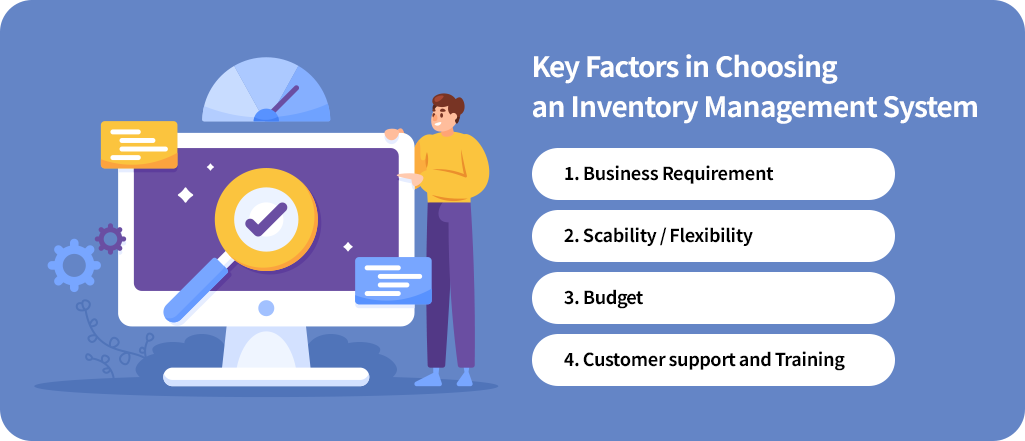
Key Factors to Consider When Choosing an Inventory Management System
Choosing the right inventory management system is a critical decision that directly affects operational efficiency, cost control, and long-term business growth.
With so many solutions available, businesses must evaluate more than just features. Below are the key factors to consider when choosing an inventory management system.
1. Business Requirement
Every business manages inventory differently, so it is important to choose a system that fits the way business actually operates.
An effective inventory management system should support your industry, workflows, and daily processes without unnecessary complexity.
By clearly defining business's requirements in advance such as order volume, inventory type, and sales channels,
businesses can better evaluate different systems and avoid unnecessary features.
2. Scability / Flexibility
As businesses grow, inventory management naturally becomes more complex.
For instance, expanding product lines, more warehouses, and more users requirement.
A scalable and flexible inventory management system helps businesses adapt to growth without needing frequent system changes,
making long-term inventory management more stable and efficient.
3. Budget
Businesses should look for a solution that balances functionality with cost efficiency.
While systems may offer similar core features, their pricing structures can vary significantly.
Also, Inventory management systems vary not only in price but also in their pricing models.
For example, on-premise systems often require high upfront setup and infrastructure costs,
while cloud-based systems typically offer a lower initial investment and faster deployment.
Understanding these pricing models in advance helps businesses choose a solution that aligns with both their operational needs and budget.
4. Customer Support and Training
Even the best inventory management system delivers limited value without proper support and training.
Reliable customer support and clear training resources help teams adopt the system faster and use its features correctly.
Ongoing support also ensures that issues are resolved quickly, minimizing disruptions and helping businesses maintain accurate inventory data over time.
Efficient Inventory Management with ECOUNT
1. Real-Time and Automated Inventory Management
ECOUNT ERP inventory management system automatically updates inventory levels whenever sales, purchase, or production transactions are recorded.
This eliminates the need for separate manual inventory entry and ensures data accuracy across all operations.
Users can also access inventory status, stock movements and updates history in real time through various reports, anytime and anywhere.
By automating inventory updates, businesses can reduce redundant tasks, minimize manual errors, and improve overall operational efficiency.
2. Automated Reorder Alerts
By using the ECOUNT inventory management system, users can receive alerts when inventory levels run low.
The system also automatically calculates optimal reorder quantities,
helping businesses maintain appropriate stock levels and prevent inventory shortages.
3. Customizable Inventory Reports
The ECOUNT ERP provides a wide range of inventory reports, including Inventory cost and profit analysis,
total inventory status, location and even movement history.
Businesses can customize report formats based on their needs, making it easier to analyze inventory performance, track stock changes, and make informed decisions using accurate data.
4. Centralized Inventory Management for All Departments
ECOUNT ERP connects inventory data across departments such as sales, purchasing, and accounting within a single platform.
Each department can access accurate, real time inventory information based on user authorization.
Screen settings, data entry forms, and report templates can be customized to fit business needs.
This integrated approach improves collaboration, data accuracy, and effective decision-making across the organization.
5. Access Anytime, Anywhere
As a cloud-based solution, ECOUNT ERP allows users to access the inventory management system anytime and anywhere,
so report checks or inputs can be performed in real time without location restrictions.
This enables businesses to manage inventory efficiently even when working remotely, visiting warehouses, or operating across multiple locations.
